
JIARUN IOT · CONNECTED LEATHER MANUFACTURING

Jiarun IOT
The digital production platform for leather factories

Orders, operations and machines strung on one line; the state of production at a glance.

Demo view · simulated data — actual visibility depends on factory authorization and deployment scope
Demo Plant · Interface illustrationdemo data--:--:--
demo data0.66MPa · set 0.66SP-02 spray unit · Pump pressure, MPa
SP-01 onlineSP-02 onlineSP-03 onlineSP-04 onlineSP-05 offline
OPERATION PLANdemo dataRaw hidesTanningDyeingBuffingSprayingQC & out
Current runSpraying · SP-02 · in progressOrder CA260710A0/ 120 pcs
demo data
Atomization0.49MPaset 0.50
Line speed8.2m/min
Reported today1,240pcs
demo data
--:--:--OKSP-02 back at set point, 0.66 MPa
--:--:--EventSpraying started
--:--:--EventBuffing done, Spraying ready
Flow · The production thread

Five stages, one thread from end to end

STEP 01

Order intake

Available nowProduction Pad
STEP 02

Step planning

Available nowProduction Pad
STEP 03

Floor reporting

Available nowWorker App
STEP 04

Operation acceptance

Available nowProduction Pad
STEP 05

Piece-rate confirmation

Available nowWeb finance

Each stage's status label comes from the capability catalogue, not from this page; what each stage delivers is opened up one outcome at a time on the solutions page.

Roles · Four role entrances

Who sits at which screen

01Available now

Production Pad

The production management workspace on a tablet: orders, operations, people, equipment and production requirements handled in one place, usable while moving around the floor.

Learn more →
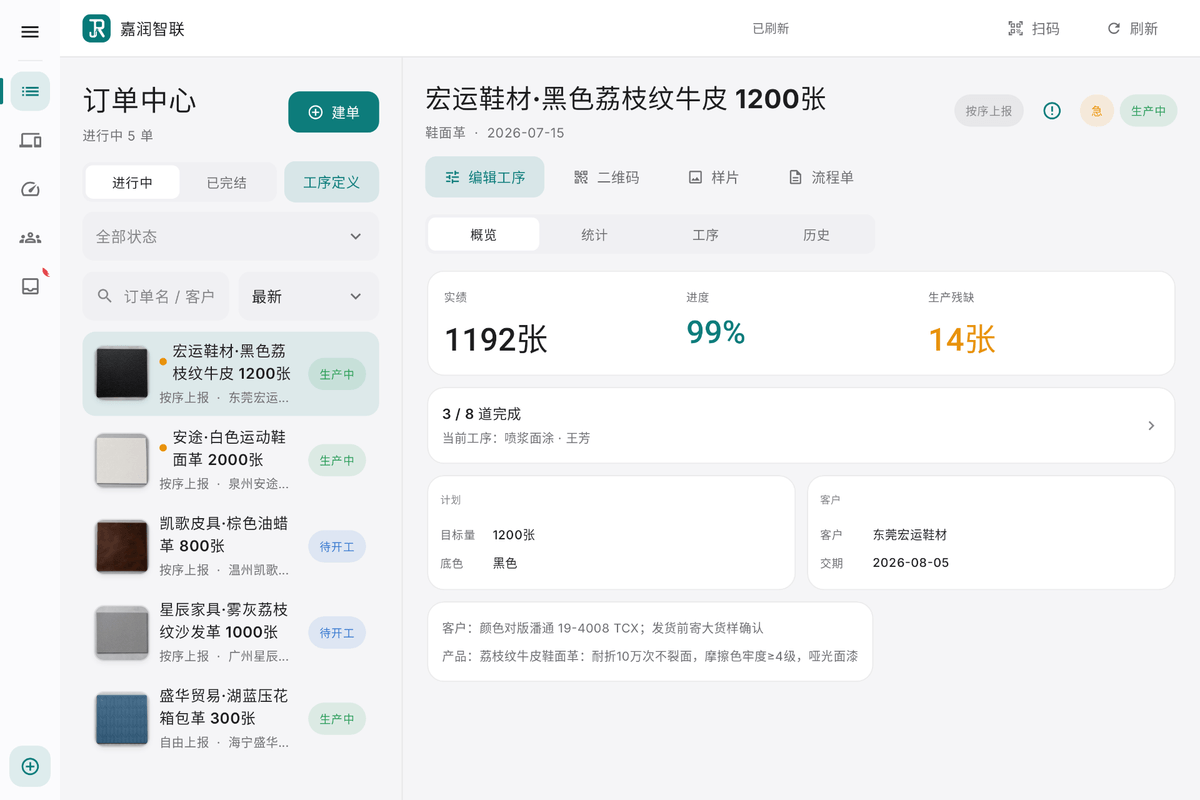
Order centre of the Production Pad: running orders on the left, the selected order's per-operation targets, output and defects on the right
Order centre · actual screendemo data
02Available now

Web finance

Piece-work and settlement done in a browser: maintain unit prices, settle order by order, work out the factory payroll; orders and production management live on the Pad.

Learn more →
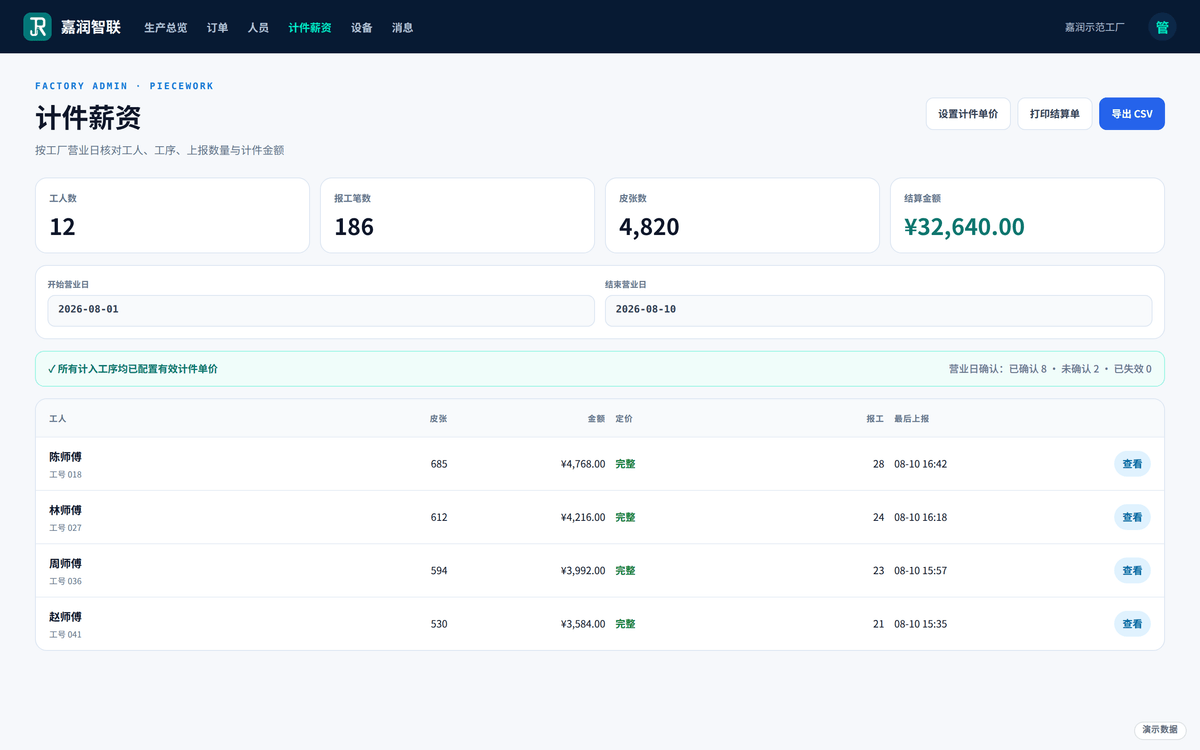
The Web finance piece-rate payroll page, listing piece counts and payable wage worker by worker
Web finance · piece-rate payrolldemo data
03Available now

Worker App

Workers sign in with a worker code — no password; pick the operation, enter the count, confirm: reporting takes three steps.

Learn more →
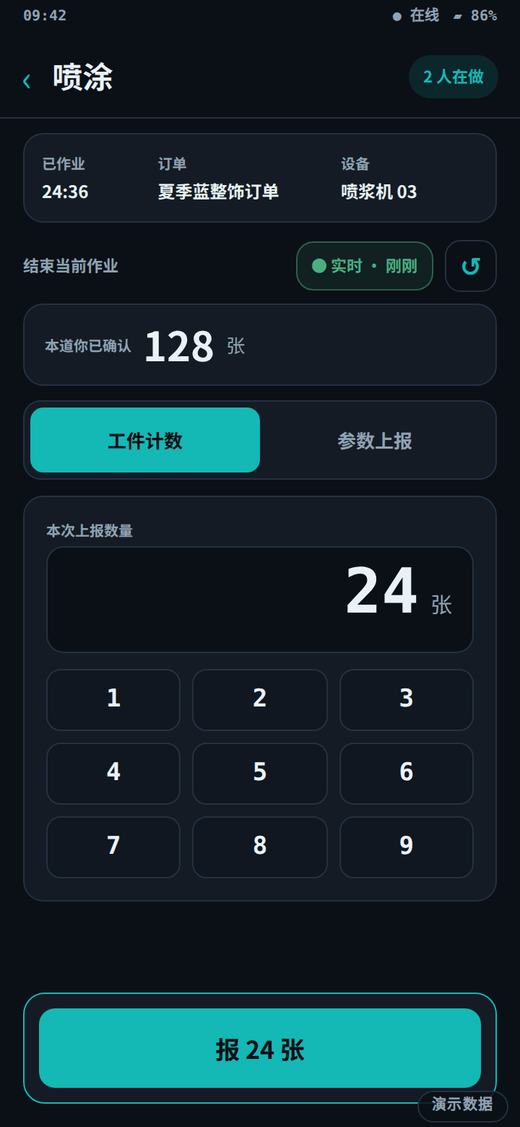
The worker app reporting screen, showing the current operation, its order and machine, and the quantity the signed-in worker has already confirmed on that operation
Worker app · reporting on the floordemo data
04Available now

Station Display

The station display refreshes the current operation queue in real time: current task, progress and the next order in one view.

Learn more →
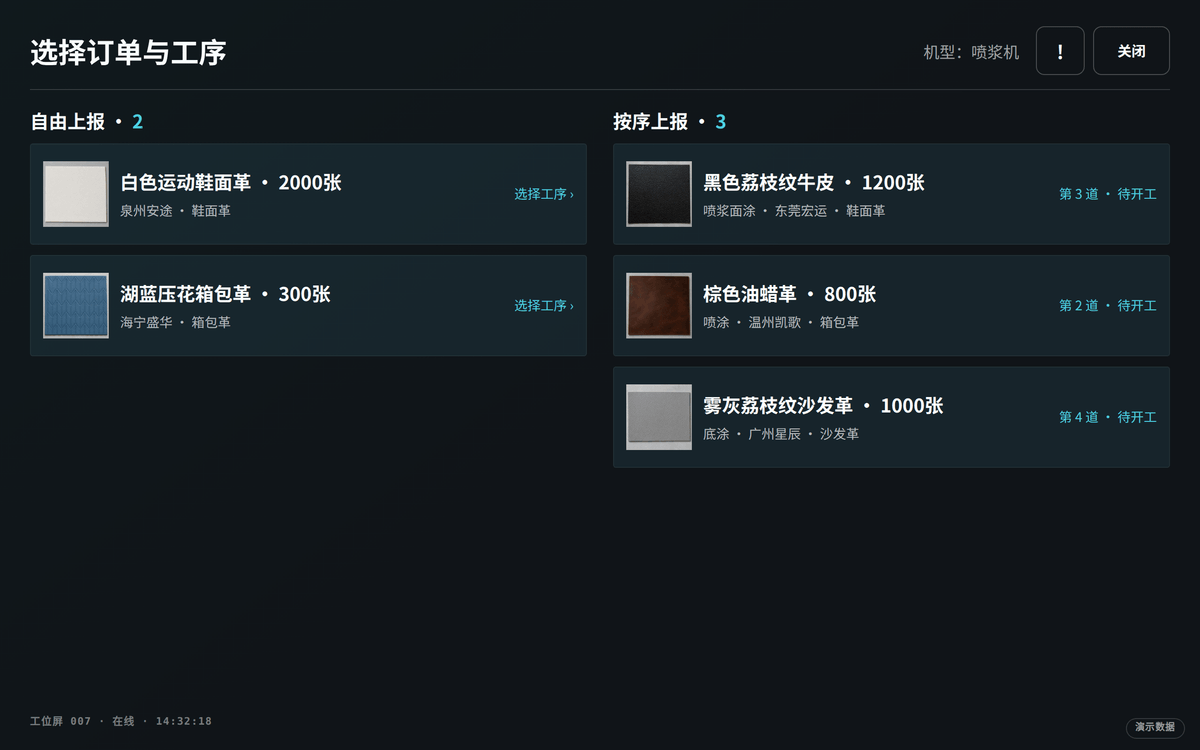
The station display's order and operation picker, large dark-theme tiles listing selectable orders, operations and reporting modes
Picking order and operation · actual screendemo data

All four pictures are captures of the real interface, with data from our demonstration factory — not renderings.

See all five role entrances in full →
HOW IT WORKS

The data link between machines, workshop and cloud

MACHINESCLOUDSHOP-FLOOR SCREENSSpray machine A (schematic)status after adaptationSpray machine B (schematic)status after adaptationSpray machine C (schematic)status after adaptationJiarun IOTLIVE DATA CHANNELProduction Padowners · plant managers · orderfollow-upWorker Appshop-floor workers · worksofflineStation Displayfixed stations · unattended
FIG.01 — The journey of factory data (schematic)
Upstream: machines → cloud Terminals read: cloud → shop floor
Live syncCentralized statusFull history
Hardware · Terminals we build

Two terminals we build, quoted per unit

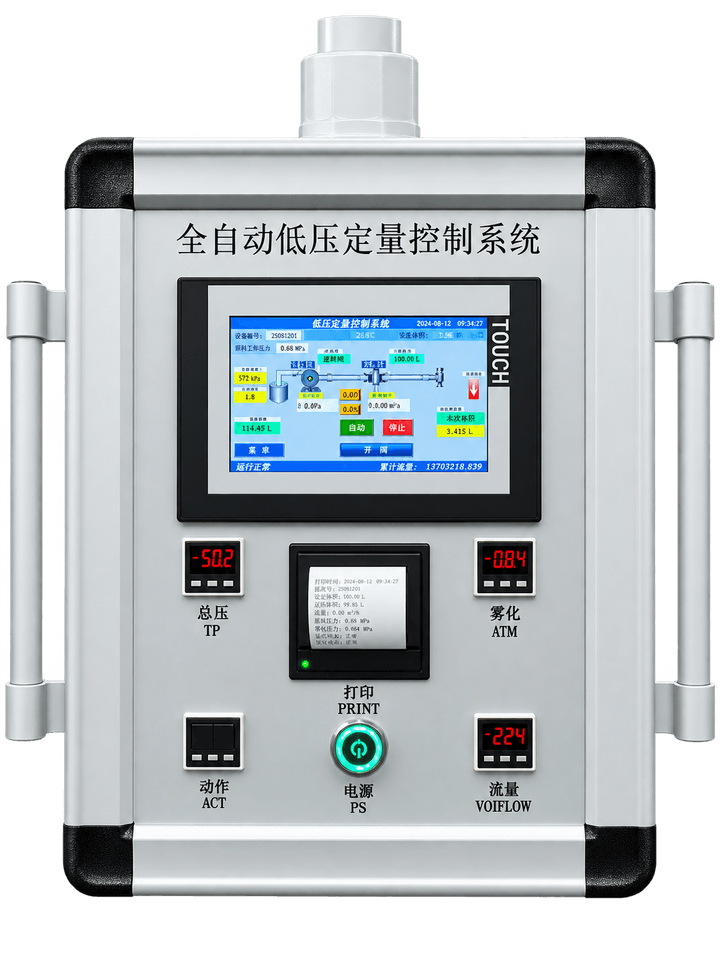
The operating panel of the spray dosing controller
JR-SDC
Available nowSpray Dosing Controller

Spray dosing controller

Mounted beside the spray machine, it replaces a mix and spray volume set by feel: parameters are chosen from a recipe on the terminal and held there, and every run keeps both the setting and the actual running data, which is then uploaded to the platform for later checking.

  • Spray volume held to the recipe
  • Parameters kept as recipes
  • Running data recorded locally
  • Uploaded for later checking
  1. Spray machine and dosing unit
  2. JR-SDC
  3. Running data uploaded and filed by machine and by timeCompatibility check
  4. Abnormal spray volume flagged and alertedPlanned

Whether it can be connected to your spray machine depends on the model, its control method and the wiring on site; that is assessed machine by machine and never assumed.

Terminal hardware is quoted per unit and is not included in any software version; quantity and model are listed when the plan is agreed.

Learn more →
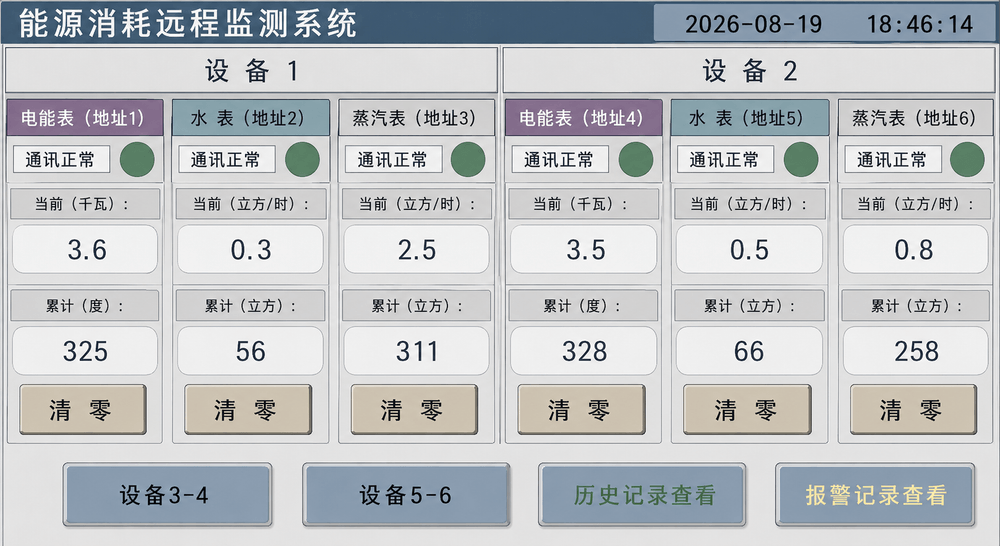
The display of the utility energy monitor
JR-UEM
Available nowUtility Energy Monitor

Utility energy monitor

It connects to the meters and circuits you already have and collects electricity and gas readings on a fixed interval. It changes nothing on your machine and only reads beside it; the readings are there to be looked at and compared, and take part in no production decision.

  • Metered per circuit
  • Aligned on a clock
  • Abnormal draw is visible
  • Fitted without altering the machine
  1. The meters and circuits already installed
  2. JR-UEM
  3. Readings uploaded per circuit and per timeCompatibility check
  4. Consumption comparison and trendPlanned

Whether it can be connected depends on the meter model, the supply conditions and the room in the cabinet; the scope is given after a site assessment, not before.

Terminal hardware is quoted per unit and is not included in any software version; quantity and model are listed when the plan is agreed.

Learn more →
REAL-TIME

Operating data from compatible equipment
viewed in the management workspace

Compatibility check
01

Device status in real time

02

Equipment beside orders

03

Clear connection scope

EVENT STREAM

demo data
AI Inside

On one production mainline,
statistics and AI analysis

Device dataFloor reportsOrder progressProduction mainline data hubSchedulingsuggestions (planned)Efficiency insights(planned)Anomaly hints(planned)
demo dataThis batch's spraying operation keeps rolling up today's reported quantity (demo data)
Compatibility check

Device monitoring

Available now

Production progress statistics

Planned

AI planning analysis & smart Q&A

About the intelligence center →
Outcomes · What a factory gets

Four kinds of outcome, each with its current status

Plans · Four versions

One thread, four versions that widen step by step

Available now

Order Tracking

For factories getting orders, reporting and piece-work running first

Available now

Factory Operations

For factories that want station displays and the read-only analysis view

Compatibility check

Connected Spray

For factories connecting spraying machines to the platform

Compatibility check

Enterprise custom

For businesses that want existing digital equipment connected to the production flow

No amounts are shown here. The line-by-line comparison is on the plan comparison page, and the actual quotation is settled separately against factory size and implementation scope.

Compare the four versions line by line →

Book a demo, evaluated against your actual process

Book a demo →